Where I Spent
Guide

How to analyze Amazon spending in India.

If your goal is to answer “how much have I spent on Amazon?” and understand the pattern behind that number, the useful view is not just a raw order list. You want totals, order count, average order value, and timing.

Step by step

  1. 1. Install the Shoplytics Chrome extension.
  2. 2. Open the extension on a supported Amazon India session.
  3. 3. Select Amazon and choose the date range you want to inspect.
  4. 4. Click “Fetch Orders.”
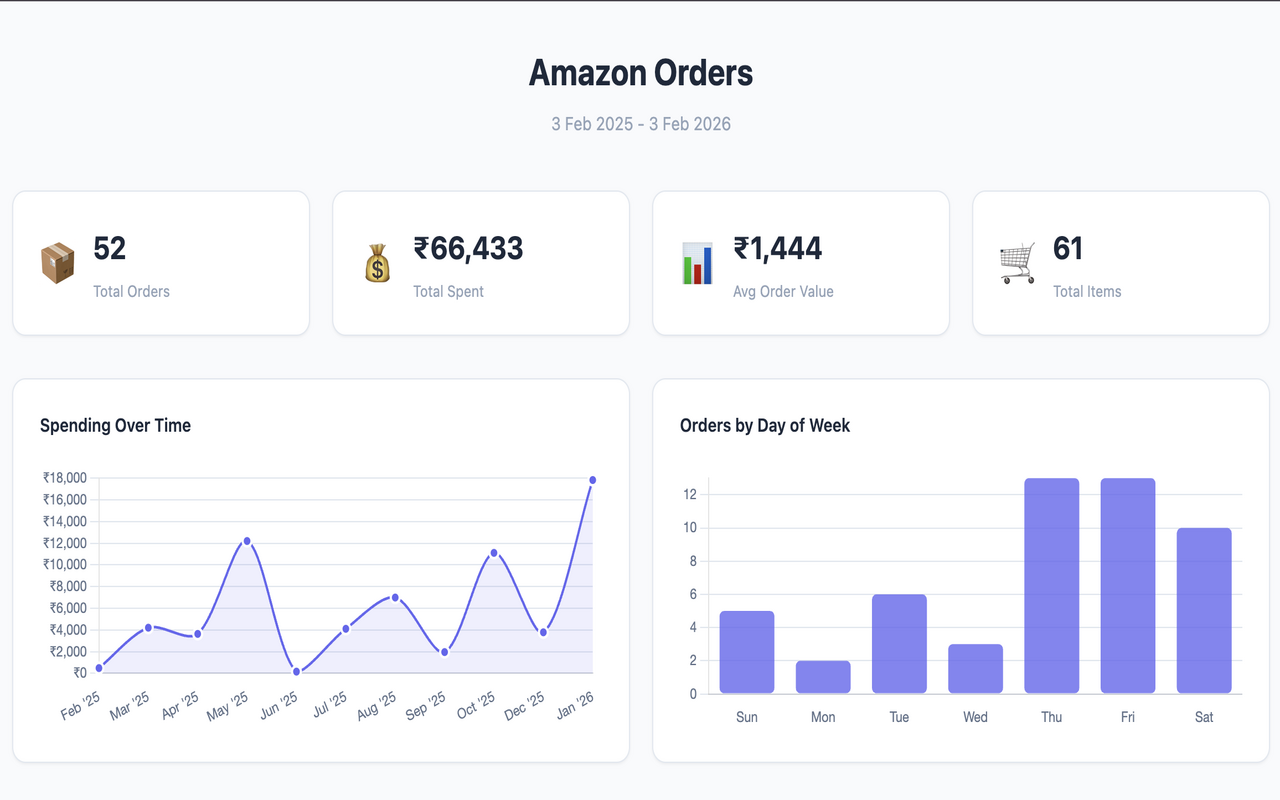
  5. 5. Read the total spend, order count, average order value, and time-based trends in the dashboard.
What to look for

  • Total spend across the selected period
  • Average order value
  • Months or weeks where spending spikes
  • Whether the buying pattern is clustered around certain days or periods
Dashboard example
Shoplytics Amazon dashboard showing total spend, total orders, average order value, and spending over time.

Why this is better than manual checking

Manual order history checking shows transactions one by one. That is useful for remembering a purchase, but not for seeing aggregate spend and behavior clearly. Shoplytics turns the same history into readable analytics.