Where I Spent
Shopping analytics & expense tracker

Track Amazon, Blinkit & Zepto spending all in one place.

Shoplytics is a private shopping analytics & expense tracker that helps users analyze fragmented order history across Amazon, Blinkit, and Zepto directly in the browser. 100% private, no login required.

Privacy promise
0
External servers storing your data

All data stays on your device. No external servers or cloud storage, no tracking, and no login wall before the product becomes useful.
Why it feels different

Private by design, useful from the first fetch.

No login. Fetch orders and view analytics immediately.

No external servers. The product works directly in the browser.

No tracking. No third-party analytics are needed to make it useful.

Live product flow

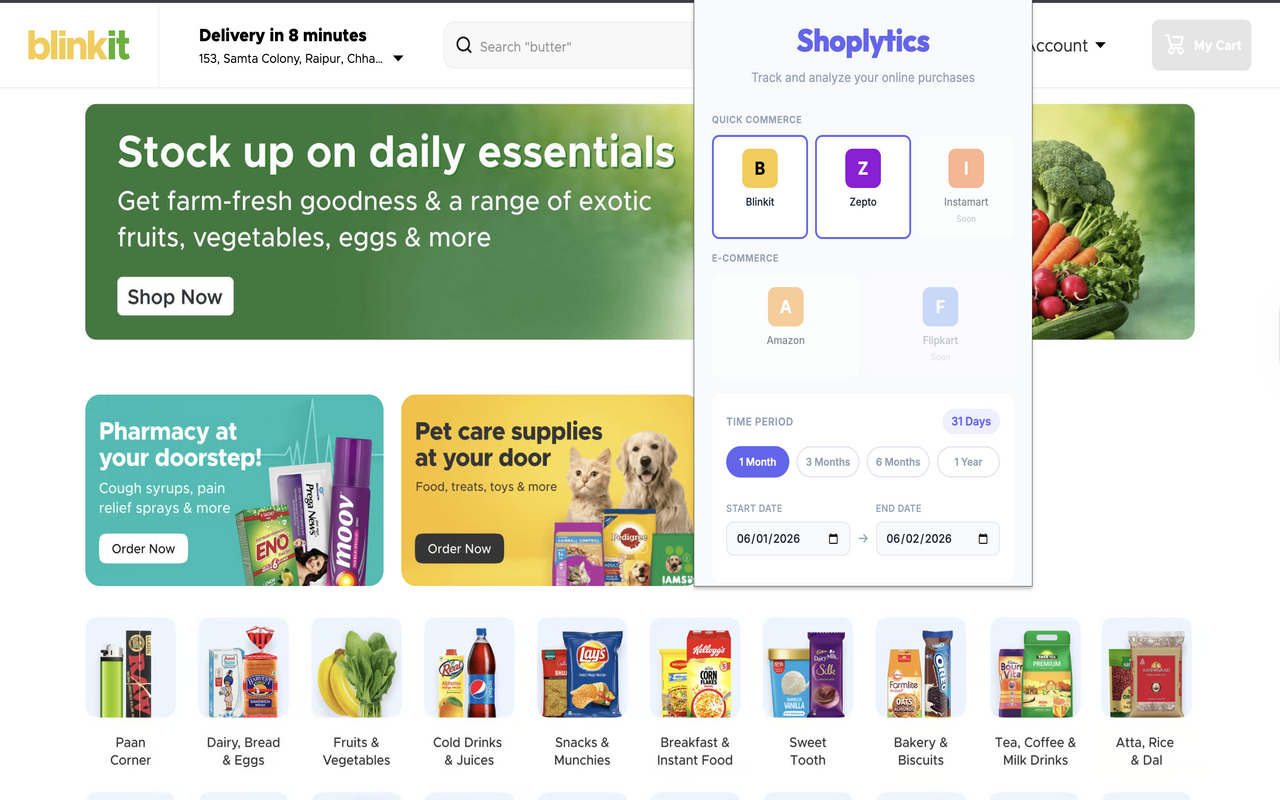
Select platforms, choose a date range, click “Fetch Orders”

Chrome extension
Shoplytics Chrome extension popup shown on a live Blinkit page with platform selection and date-range controls.
Coverage now

Amazon, Blinkit, Zepto

The current rollout is India-first. Amazon India, Blinkit, and Zepto come together in one private view so users can read e-commerce and quick-commerce behavior side by side.

Amazon India Blinkit Zepto
Current status

Early-stage, already functional

Core analytics are already working for a small set of users, around 15 people, while more platforms and deeper insights are still in development.

Dashboard

Read totals, trends, and habits in one analytics view.

Online shopping data is fragmented by default. Shoplytics turns it into a clean dashboard so users can see total spending, average order value, order timing, and platform-level patterns without manual tracking.

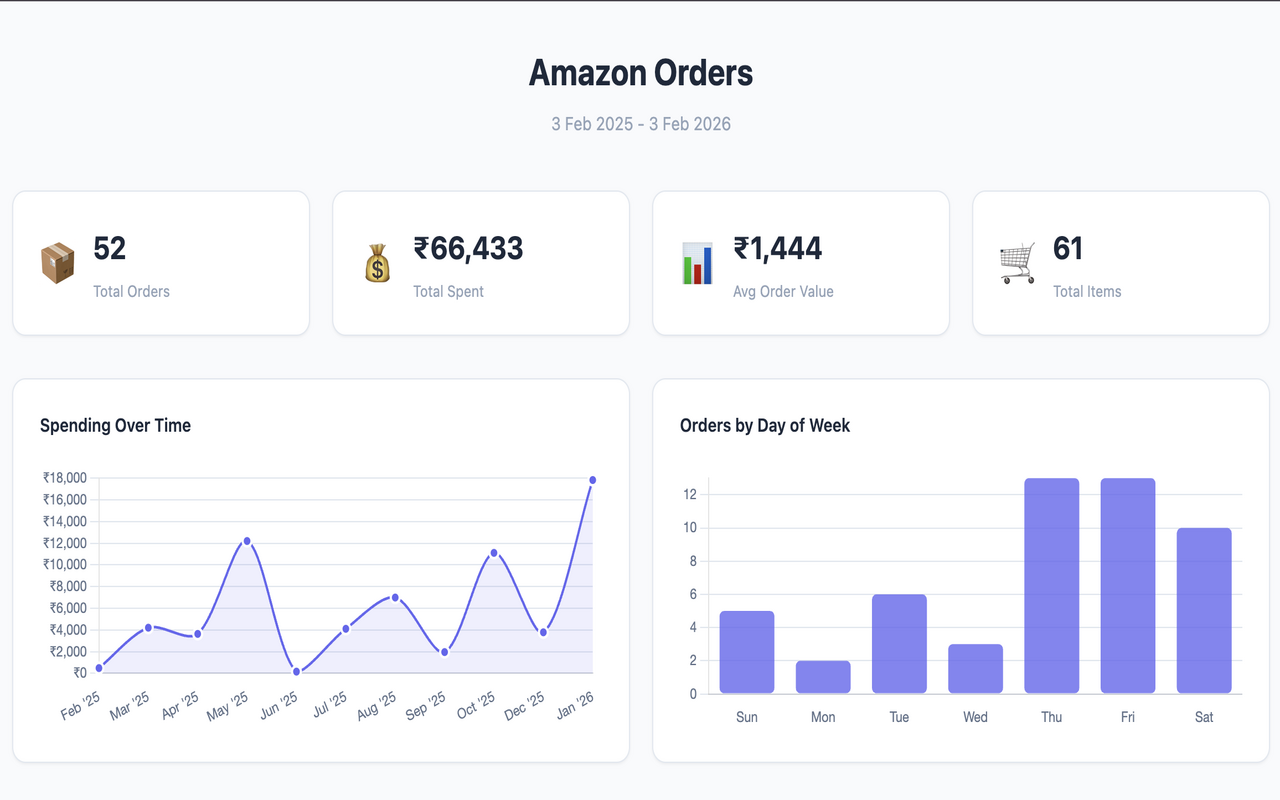
Sample total spend
₹66,433

Example value from the live Amazon dashboard view.

Sample order count
52

A quick read on order volume before drilling into patterns.

Sample average value
₹1,444

High-level purchase behavior at a glance.

Flagship product proof

Fetch once, then compare Amazon with quick commerce behavior.

Swipe or tap to compare dashboard views
1 / 2
Shoplytics Amazon Orders dashboard showing total orders, total spend, average order value, total items, spending over time, and orders by day of week.
Amazon view: total orders, total spend, average order value, total items, and behavior by time and weekday.
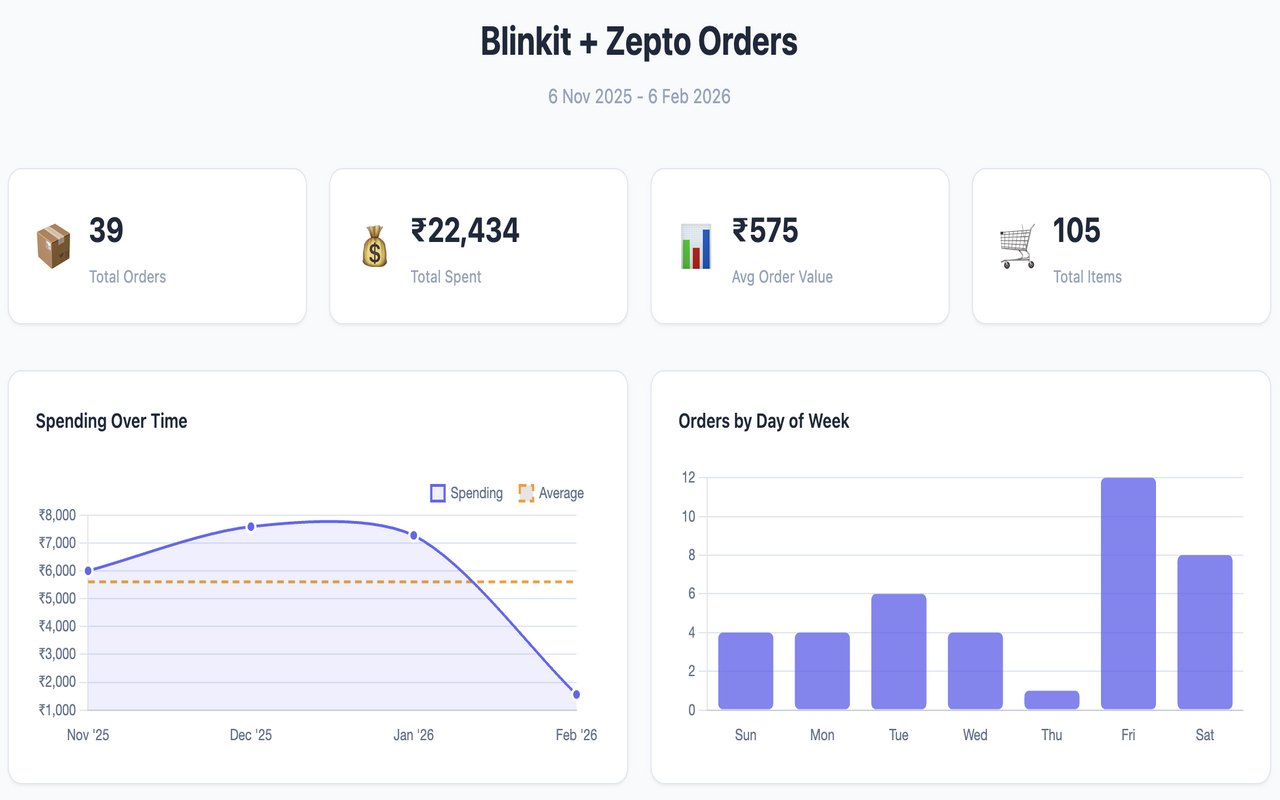
Shoplytics Blinkit and Zepto dashboard showing total orders, total spend, average order value, total items, spending over time, and orders by day of week.
Quick commerce view: Blinkit and Zepto combined into one screen with totals, trends, and order timing patterns.
Insight surface

What the user learns immediately

Total spending across platforms
Visibility
Monthly and platform-wise trends
Trends
Average order value and timing
Behavior
Most purchased items and repeat habits
Patterns
Secondary action

Export your shopping data to CSV

Export the fetched data for deeper analysis or personal budgeting workflows without changing the local-first model.

Read the CSV export guide →
Platforms

Shoplytics already covers the platforms that matter most.

Amazon India provides broad order history, while Blinkit and Zepto reveal quick-commerce and grocery behavior. The goal is one India-first view across all of them, not isolated silos.

Swiggy Instamart Flipkart BigBasket
Supported today
Amazon India
Useful for understanding total spend, higher-value orders, monthly trends, and long-range shopping behavior.
Amazon expense tracker page →
E-commerce
Blinkit
Useful for reading frequent grocery top-ups, convenience spend, and short-cycle purchase behavior.
Blinkit spending analysis →
Quick commerce
Zepto
Helps compare last-minute shopping habits and repeat urgent orders against the rest of the basket.
Zepto expense tracker →
Quick commerce
How the flow works
Choose platforms

Select one or more supported sources.

Set the range

Pick a period or custom dates to inspect.

Fetch orders

Read the analytics instantly after the user triggers the fetch.

Security

100% private, no login required.

Shoplytics is designed so the trust model stays obvious in product behavior, not hidden in small print. All data stays on your device. No external servers or cloud storage.

All data stays on your device No external servers or cloud storage No tracking No login or account required
No tracking

No third-party analytics are needed to make the extension useful.

No login wall

Users can fetch orders and see analytics without creating an account first.

Local-first architecture
0
External servers touching your shopping data

The product works directly in the browser without a remote data layer. Privacy is part of the architecture, not a marketing claim.

Read the privacy policy →
Current status

Early-stage Chrome extension

Core analytics are already functional for a small set of users, around 15 people, while more platforms and deeper insight layers are still in development.

Insights

What the user learns after one fetch.

View on Chrome Web Store →
Visibility
Core

Total spending across platforms

Understand how much is being spent overall instead of checking Amazon, Blinkit, and Zepto one by one.

Patterns
Trend

Monthly and platform-wise trends

See when spending spikes, which platform is driving it, and how shopping frequency changes over time.

Behavior
Habit

Average value, items, and shopping habits

Use order value, item mix, and timing patterns to understand habits rather than isolated transactions.

Start here

Install the extension and fetch your shopping data to see your spending insights instantly.

Export your shopping data to CSV for deeper analysis or budgeting. The current product is early stage and already functional for a small set of users.